 GOLF FELLOW
Every round you play, in one place.
Add a round from a scorecard screenshot, a file or by hand. See your fairways, greens and putts across every course you play, and let Fellow, your coach, pick what to practise next.
On the App Store in the UK, Ireland and Iceland. Free to start, no card needed. Your first Fellow review is on us.

A hole's shot trail, Fellow's evidence, and what to practise next
The iPhone app is in the UK, Ireland and Iceland for now, and Android follows. Golf Fellow also works in your browser at app.golffellow.app.
How it starts
-
Add a round
A screenshot of the scorecard from any golf app, a simulator round, or a card typed in by hand. Ten imports a month are free, and typing a round in always is.
-
See your numbers
Fairways hit, greens in regulation, putts and scrambling, measured against your net par: par for you, once your handicap strokes are counted.
-
Practise one thing
Fellow reads the round and says what to work on. Your first review is free, and every number stays free after it.
See where your shots go
The app draws your own shots like this. This one is a real simulator session from one of our test accounts.
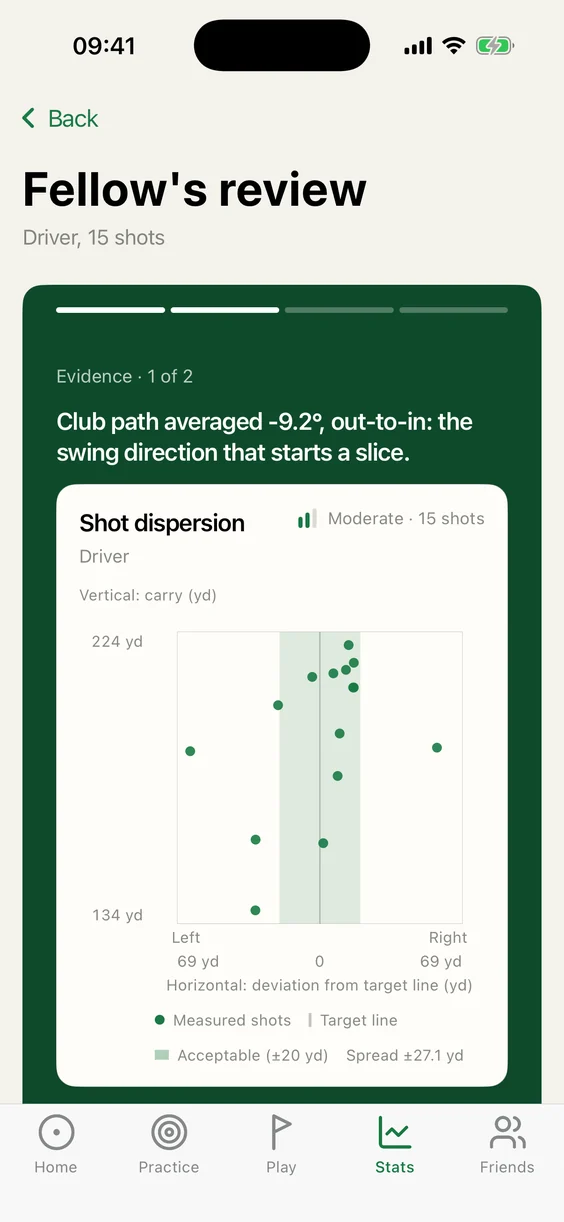
Where 15 drives went
One simulator session with the driver, seen from above. Each flight starts where that shot’s face and club path send it and ends where it landed.
- Spread
- ±27.1 yd
- Acceptable band
- ±20 yd
- Club path
- −9.2°, out-to-in
- Face to path
- +6.4°, open
Every swing came from out to in. On 12 of the 15 the face was open to that path, which sends the ball curving right: a slice. On the other 3 the face was shut, so the ball started left and stayed left: a pull.
Club path averaged −9.2°, out-to-in: the swing direction that starts a slice.
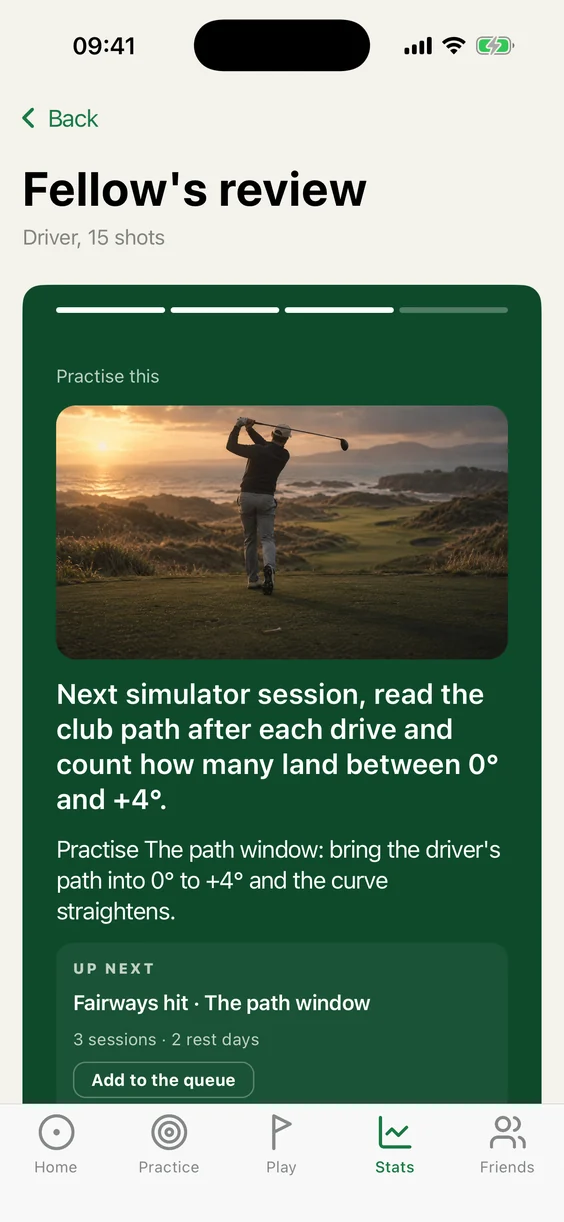
Fellow then picks one thing to practise for the next session.
A coach that knows your numbers
Most golf apps show you the stats for the round you just finished. Golf Fellow adds every round together, across every course, and shows your fairways, greens, putts and scrambling.
The screens on this page are the app as it is today, on one of our test accounts.
The analysis Premium
Your golf read, not just counted
Fellow goes through a round hole by hole, or a simulator session shot by shot, points at what went well and what to practise, and shows the evidence: here, where 15 drives finished and the club path behind them.
The numbers are measured. The verdict is Fellow's. The two are never mixed, and you can always see which is which.
That line is the price boundary too: the numbers on the card are free, from strokes over par on every hole to putts, greens and fairways and the rest of your stats. Fellow's words come with Premium, and your first review is free.
Fellow's review of 15 simulator drives
Your courses
Your course, hole by hole
One page per course you play: rounds, average, best round, and your average score on every single hole.
It also ranks the holes with the most to gain there, so you can see at a glance which three holes to work on first.
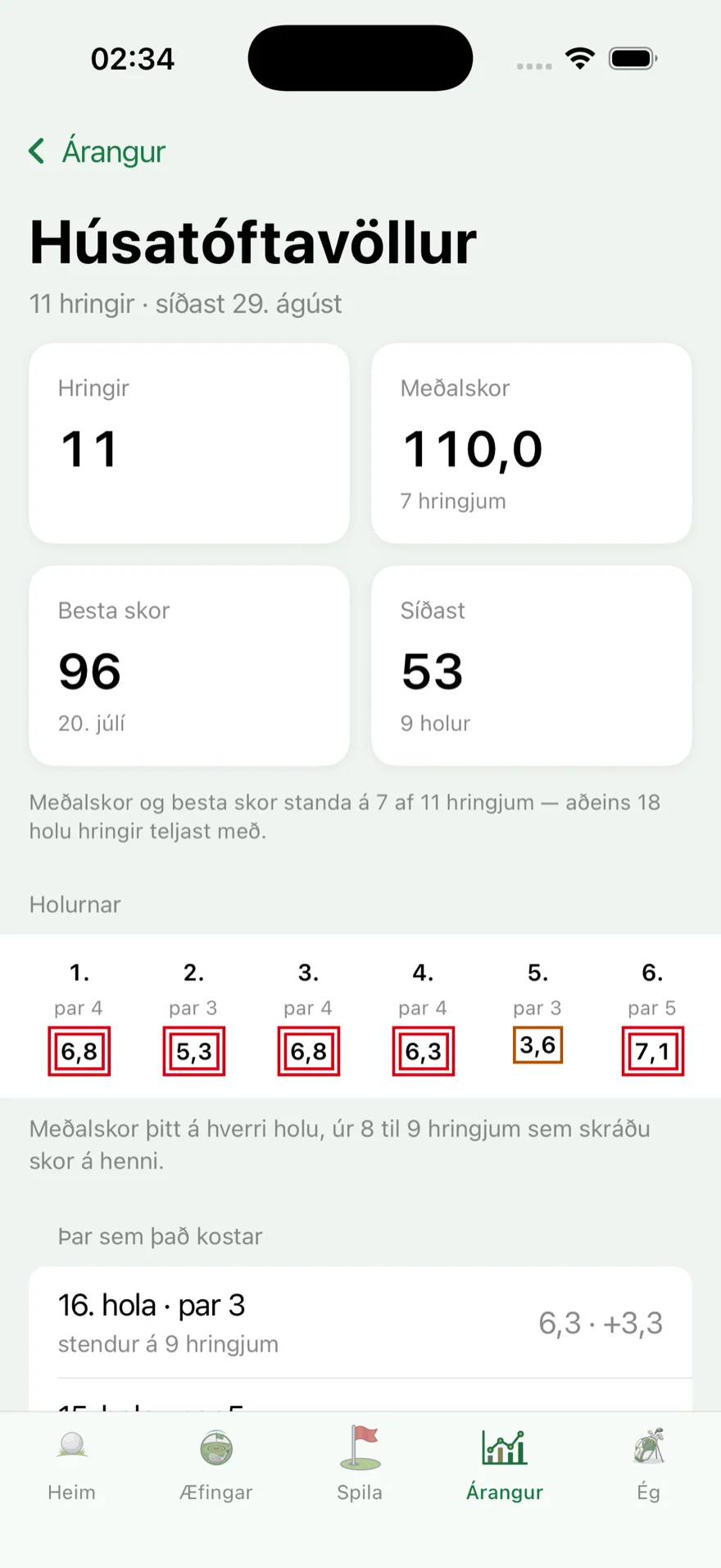
One page for each course you play
Friends Free
Who is ahead this month
“The month” ranks you and your friends by best score and by rounds played, and shows who won last month. That is usually what pulls people back in on the first.
Everything to do with friends is free: friends' rounds on your home screen, the shared scorecard, the friend page. None of it sits behind Premium.
On the course
Mark your shots where they land
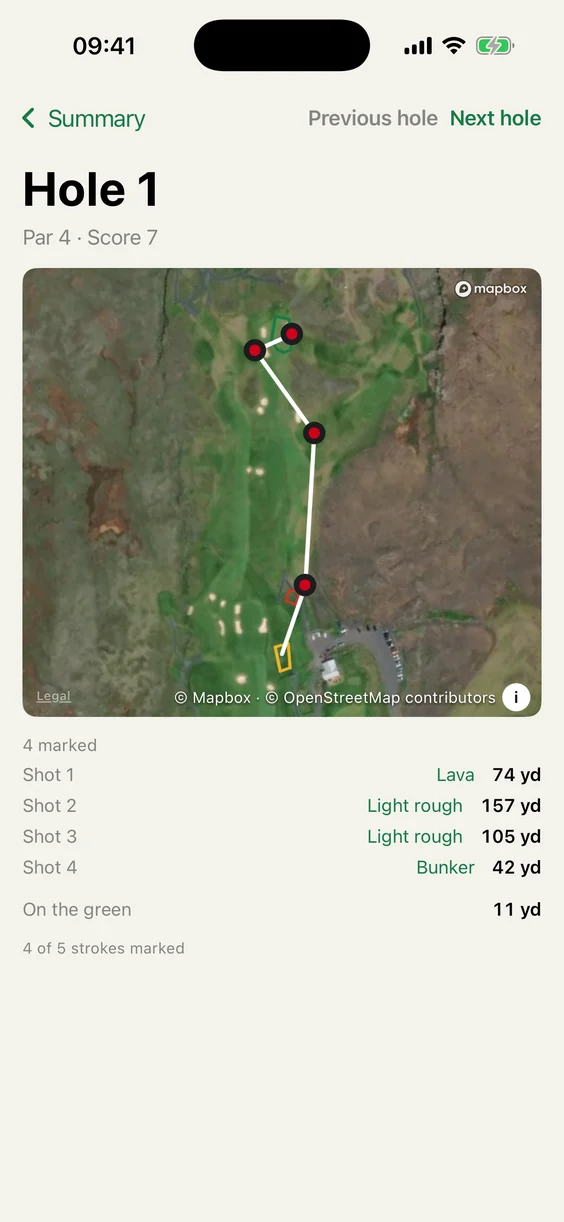
Keep score as you play it, and the distance to the green is always on screen. GPS marks every shot, and afterwards each hole shows its trail: where every shot finished, its lie and its yards.
Golf Fellow also has an Apple Watch app, in beta for Premium members.
A live club recommendation comes with Premium, for example “142 yards, 22 mph against, plays like 166”, and which club out of your own measured distances gets there.
One hole, every shot marked
Your data
You bring your own data
A screenshot of a scorecard from any golf app, a simulator round or practice session, a round typed in by hand: it all goes in. Your rounds on a course count towards your statistics; simulator golf is kept apart, because it measures a different game.
Your handicap index is the one you type in. There is no automatic import of it.
Golf Fellow never goes and gets data about you from another golf app on its own account. You bring your own. That is not a policy we could change our minds about: the app is built that way.
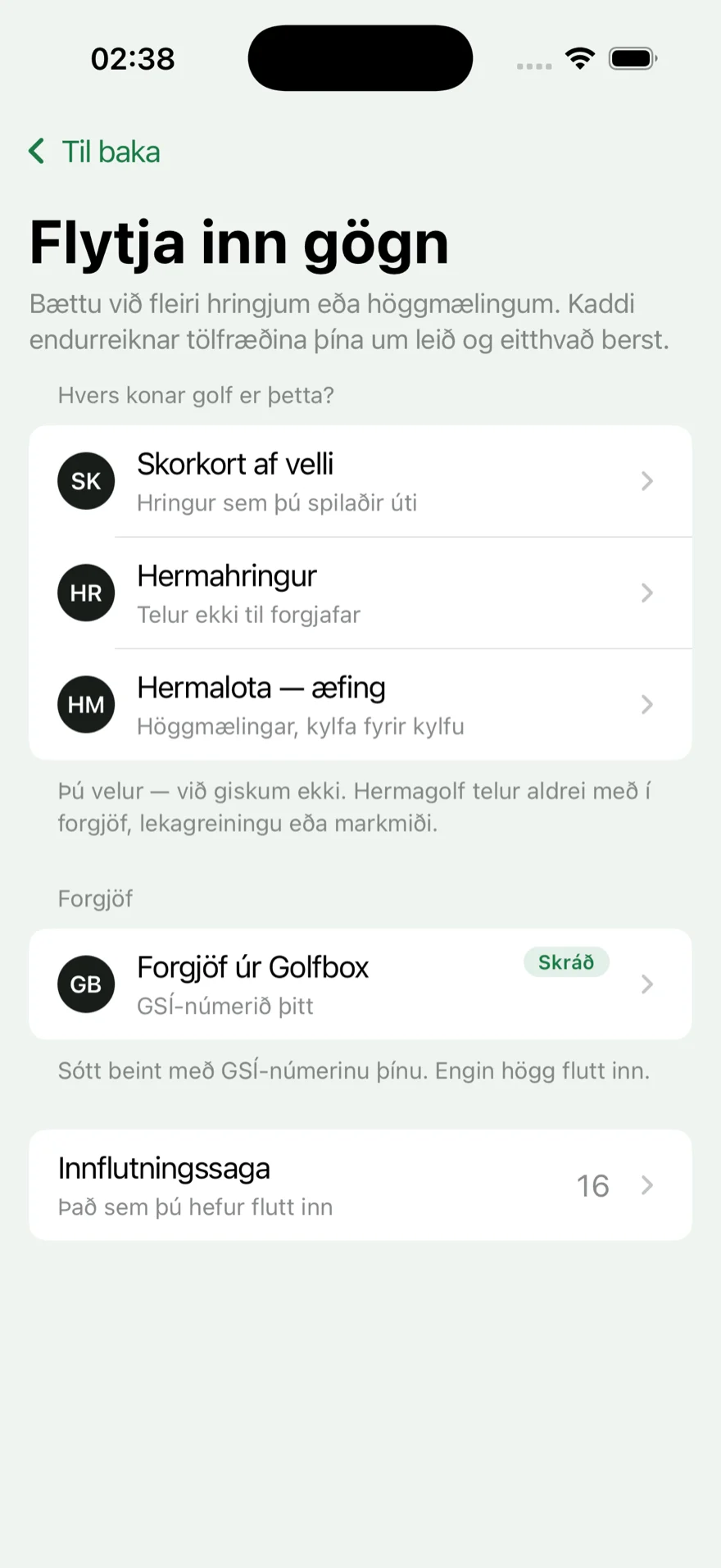
Importing your data
Start with one round. Your numbers are free, and so is Fellow's first review.
Download on the App StoreFree and Premium
The line is simple, and it does not move. Premium is $9.99 a month or $59.99 a year, with a free week to try the yearly plan.
Your own golf is free
Every measurement, every card, every statistic drawn from your own rounds, however much arithmetic sits behind it. You do not pay to get your own numbers back. Scoring a live round, with every detail you choose to record, and every round you add by hand are free, and so are 10 imports a month, plus 15 extra in your first 30 days.
Premium is the work done for you
Fellow reads the round and writes the analysis. And out on the course: which club, in this wind, at this distance. That is a decision taken for you, not a number you read afterwards. The Apple Watch app is in beta for Premium members.
| Feature | Free | Premium |
|---|---|---|
| Live scoring, with all the detail you record | ✓ | ✓ |
| Apple Watch app (beta) | — | ✓ |
| Topics, numbers and your clubs | ✓ | ✓ |
| Friends and comparison | ✓ | ✓ |
| Swing analysis from video | 1 included | ✓ |
| Fellow's analysis and the practice plan | Your first review, free | ✓ |
| Insights and handicap-band comparison | — | ✓ |
| Live club recommendation on the course | — | ✓ |
Prices are in US dollars; the App Store shows your local price and taxes. Renews automatically; cancel any time. Premium includes 20 swing analyses a month, on the monthly and the yearly plan. Single swing analyses are also sold as credits, which never expire.
Your data, your rules
Golf Fellow never fetches data about you from another golf app: what it knows about your golf, you brought or recorded yourself. That is not just a policy. It is how the app is built.
Your location, plainly
The app uses your phone's location, only while you use it, to find the course you are on and to measure your shots. Finding nearby courses sends your position to our server, and the shots you mark in a round are saved with that round in your account. We never sell your location or share it with advertisers.
You can delete everything
Your account and all of your data can be deleted from inside the app itself, not by email and a wait.
Search shows a name and a club
Someone who finds you in search sees only your name, your club and how many friends you share, never your photo, handicap or rounds. You can hide yourself from search entirely. A round you play with others is different: in a live round shared with friends, its players and the friends of any of them can follow it hole by hole. The privacy policy says exactly who sees what.
Ready to see your stats?
Get the iPhone app, or start in your browser. Add a round, see your numbers and get Fellow's read. It's free to start.
Do I need an iPhone?
No. Everything except playing a round live works in your browser, on a phone or a computer. The iPhone app is on the App Store in the UK, Ireland and Iceland for now, and Android follows.
What does it cost?
Your own numbers are free. Premium, with a Fellow review after every round, is $9.99 a month or $59.99 a year, with a free week to try the yearly plan. Your first review is free without it.
Can I cancel?
Yes, any time. Premium renews automatically until you cancel it, and you can delete your account and all of your data from inside the app.